![stoneridgeapp.png]](https://www.stoneridge.app/hs-fs/hubfs/stoneridgeapp.png?height=50&name=stoneridgeapp.png)
Symptoms and perceived side effects
Truck ignition is on, other accessories and the instrument cluster are working as expected, but driver monitor is showing a black screen.
Troubleshooting and possible resolution steps
- Turn ignition OFF, wait for system to power down completely (wait 2 minutes for power down).
- Check Driver side monitor connections are properly seated
- Disconnect and reconnect and listen for a "click" to ensure properly connected
- Check the driver side coaxial cable is properly seated at the ECU
- Disconnect and reconnect and listen for a "click" to ensure properly connected
- Check the driver side coaxial cable connections on the main and backup Cameras are properly seated.
- Disconnect and reconnect and listen for a "click" to ensure properly connected
-
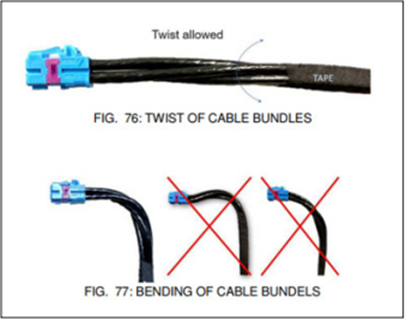
Ensure there are no pinched/ bent / damaged wires or loose connection. If damaged wires were detected, contact customer service for additional support.
- Turn ignition ON and check to see if screens turn on correctly.
- If the issue persists, Contact the MirrorEye Technical support team by calling 888-624-4474
Related DTCs
- Driver Side Permanent Safe State
- Driver backup camera 35V POC open-circuit
- Driver main camera 35V POC open-circuit
- Driver backup class II / IV camera communication failure
- Driver main class II / IV camera communication failure
- Driver frame rate below limit
- Driver CVP processing unit failure
- CVP Driver Side Safety Fault
Published 12/2025 Revised xx/xxxx