![stoneridgeapp.png]](https://www.stoneridge.app/hs-fs/hubfs/stoneridgeapp.png?height=50&name=stoneridgeapp.png)
Symptoms and perceived side effects
Truck ignition is on, other accessories and the instrument cluster are working as expected, but passenger monitor is showing black screen.
Troubleshooting and possible resolution steps
- Turn ignition OFF, wait for system to power down completely (wait 2 minutes for power down).
- Check Driver side monitor connections are properly seated
- Disconnect and reconnect and listen for a "click" to ensure properly connected
- Check the driver side coaxial cable is properly seated at the ECU
- Disconnect and reconnect and listen for a "click" to ensure properly connected
- Check the driver side coaxial cable connections on the main and backup Cameras are properly seated.
- Disconnect and reconnect and listen for a "click" to ensure properly connected
-
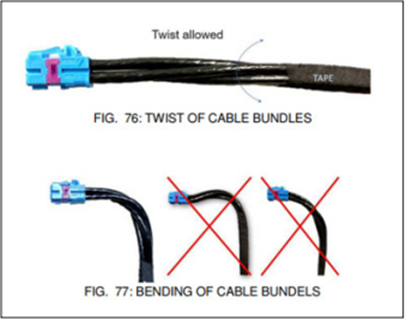
Ensure there are no pinched/ bent / damaged wires or loose connection. If damaged wires were detected, contact customer service for additional support.
- Turn ignition ON and check to see if screens turn on correctly.
- If the issue persists, Contact the MirrorEye Technical support team by calling 888-624-4474
Related Events
- Passenger Permanent Safe State
- Passenger backup camera 35V POC open-circuit
- Passenger main camera 35V POC open-circuit
- Passenger backup class II / IV camera communication failure
- Passenger main class II / IV camera communication failure
- Passenger frame rate below limit
- Passenger CVP processing unit failure
- CVP Passenger Side Safety Fault
Published 12/2025 Revised xx/xxxx