![stoneridgeapp.png]](https://www.stoneridge.app/hs-fs/hubfs/stoneridgeapp.png?height=50&name=stoneridgeapp.png)
Symptoms and perceived side effects
Other features which demand the use of the joystick are also not working. i.e. Not possible to access the menu, night view, zoom feature, and power folding not working.
Troubleshooting and possible resolution steps
- Turn ignition OFF, wait for system to power down completely (wait 2 minutes for power down).
- Turn ignition ON and check to see if Issue is resolved
- If issue persists Perform the following checks
- Check Internal CAN wires. Verify there is not a short-circuit between vehicle CAN high and CAN low wires.
- Inspect to ensure there are no pinched wires in the MirrorEye MKII harness or any non-standard connections.
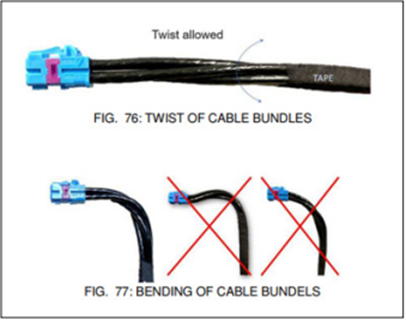
- Verify the joystick is working properly and the connector is fully seated
-
- Disconnect and reconnect and listen for a "click" to ensure properly connected
-
-
If the issue persists, Contact the MirrorEye Technical support team by calling 888-624-4474
Related Events
- CAN2 Bus OFF (Internal CAN Bus OFF)
Published 12/2025 Revised xx/xxxx