![stoneridgeapp.png]](https://www.stoneridge.app/hs-fs/hubfs/stoneridgeapp.png?height=50&name=stoneridgeapp.png)
Symptoms and perceived side effects
Truck ignition is on, other accessories and the instrument cluster are working as expected but driver's menu is not accessible via the joystick controller
Troubleshooting and possible resolution steps
-
Turn ignition OFF, wait for system to power down completely (wait 2 minutes for power down).
-
Turn ignition ON and check to see if Issue is resolved
-
If the menu does not function as expected, then verify the joystick is connector is fully seated
-
-
Disconnect and reconnect and listen for a "click" to ensure properly connected
-
-
- If the issue persists upon reseating the joystick connector, connect a new functional Joystick Controller and verify controller buttons work properly. Check and note the following function upon pressing:
-
-
- Day/Night Mode: upper-right button.
- Manual Power Fold: upper-center button.
- Monitor Brightness: upper-right button.
- Driver Side Manual Panning: lower-left button.
- Passenger Side Manual Panning: lower-right button.
-
-
- If the mentioned buttons on Step 3 do not function as expected, then proceed with the following Checks:
-
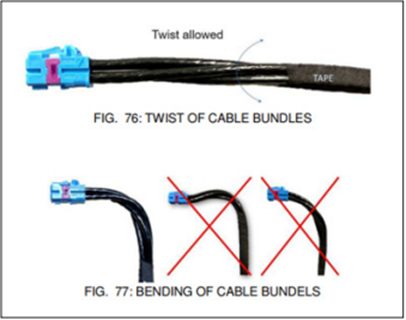
Ensure there are no pinched/ bent / damaged wires or loose connection. If damaged wires were detected, contact customer service for additional support.
- Check Internal CAN wires. Verify there is not a short-circuit between vehicle CAN high and CAN low wires.
- Check if the CAN terminating resistor is connected.
- Check Internal CAN wires for an open circuit
- Correct any wiring concerns found per the OEM guidelines
-
- If the issue persists, Contact the MirrorEye Technical support team by calling 888-624-4474
Related Events
- CAN2 bus off
Related Articles
Published 12/2025 Revised xx/xxxx