![stoneridgeapp.png]](https://www.stoneridge.app/hs-fs/hubfs/stoneridgeapp.png?height=50&name=stoneridgeapp.png)
Symptoms and perceived side effects
-
Turn ignition OFF, wait for system to power down completely (wait 2 minutes for power down).
- Turn ignition ON and check to see if Issue is resolved
- If issue persists perform the following checks:
- Check that there is no dirt or debris between the wing and support bracket.
- If dirt and debris exist remove and verify if issue still exists.
- Check affected wing's connector.
- Disconnect and reconnect and listen for a "click" to ensure properly connected
-
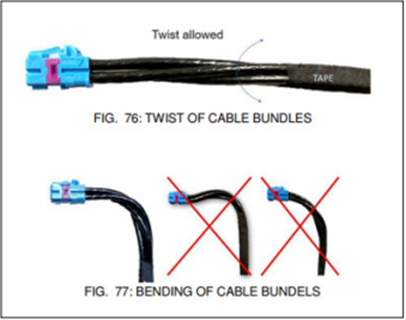
Ensure there are no pinched/ bent / damaged wires or loose connection. If damaged wires were detected, contact customer service for additional support.
- Check that there is no dirt or debris between the wing and support bracket.
-
If the issue persists, Contact the MirrorEye Technical support team by calling 888-624-4474
Related Events
- Driver Power Fold Timeout
- Passenger Power Fold Timeout
Published 12/2025 Revised xx/xxxx