![stoneridgeapp.png]](https://www.stoneridge.app/hs-fs/hubfs/stoneridgeapp.png?height=50&name=stoneridgeapp.png)
Follow these steps to recalibrate the steering wheel:
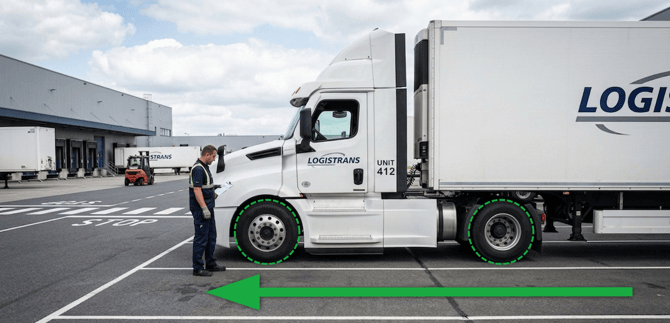
- Make sure that the truck's wheels are in a straight position and that the vehicle is parked.
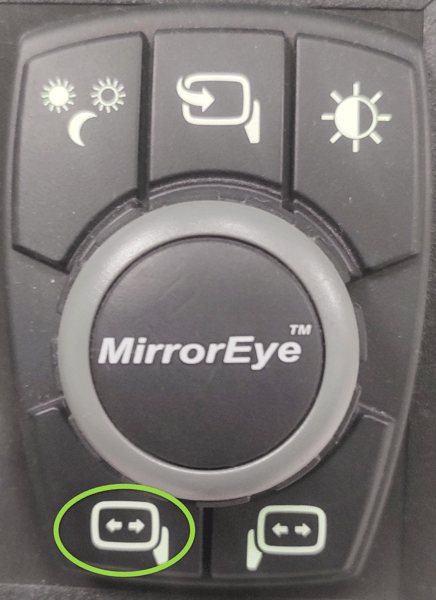
- Turn the truck's ignition on and open the driver's menu on the joystick by pressing and holding the lower-left button.
- Select the Panning menu by pressing the controller's central knob.
-jpg.jpeg?width=600&height=546&name=Media%20(3)-jpg.jpeg)
- Rotate the controller's central knob and select the Steering Wheel Calibration option.
-jpg.jpeg?width=600&height=566&name=Media%20(4)-jpg.jpeg)
- Select confirm.
-jpg.jpeg?width=600&height=567&name=Media%20(5)-jpg.jpeg)
After executing all the above steps, ensure that, in every ignition is turned on, you wait for the black bar that splits the monitors to appear (this takes about 15 seconds after the ignition is turned on). This allows the full system to complete the start-up, then after which you can test all the features, including the auto panning and zoom mode.